SQL90 min total · 18 parts
SQL Fundamentals: Joins, NULL, Aggregate Functions, and Subqueries
Part 2 of 18 · ~6 min
Join Types and What Each One Keeps
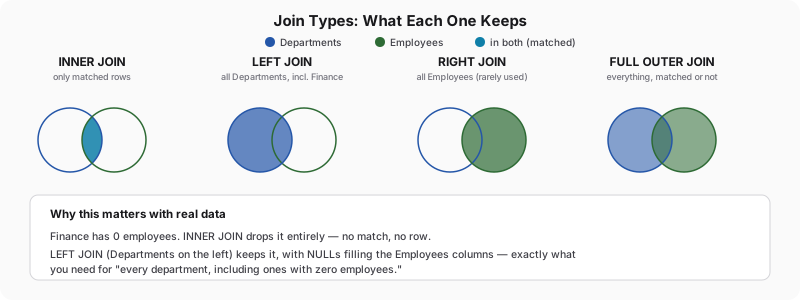
Slide one is the simplest thing on the report: headcount by department. You write the obvious query.
SELECT d.dept, COUNT(e.id) AS employee_count
FROM Departments d
JOIN Employees e ON d.dept = e.dept
GROUP BY d.dept;
Four rows come back: Sales, IT, HR, and their counts. Finance is not one of them. Not "Finance: 0" — Finance simply isn't in the output at all, and if you're building a slide that's supposed to list every department, a missing row is a much worse bug than a wrong number, because nothing about the output looks incomplete. There's no error, no blank cell, nothing to notice. You'd have to already know Finance exists to realize it's gone.
That plain JOIN is an INNER JOIN — the keyword JOIN on its own defaults to it in every engine. An INNER JOIN only keeps a row when both sides have a match, and Finance has no matching rows in Employees, so it never survives the join in the first place. GROUP BY never gets a chance to produce a zero for it, because there's nothing left to group.
Everything that distinguishes one join type from another boils down to a single question, asked once per row: this one has nothing to pair with on the other side — does it survive, or does it get dropped?
| Join | What survives |
|---|---|
INNER JOIN | Whatever's left after rows with nothing to pair with, on either side, get dropped |
LEFT JOIN | Every row from the left table — unmatched ones get the right-hand columns filled with NULL |
RIGHT JOIN | The mirror image — every row from the right table, NULL-filled on the left where nothing matches |
FULL OUTER JOIN | Everything — every row from both tables survives, paired up wherever a partner exists and padded with NULL on whichever side doesn't |
Swap the keyword and Finance comes back:
SELECT d.dept, e.name
FROM Departments d
LEFT JOIN Employees e ON d.dept = e.dept;
-- Finance | NULL   ← the row exists now, with no employee to attach
LEFT JOIN says "keep every row from Departments, no matter what." When there's nothing to match on the Employees side, it doesn't drop the row — it fills every Employees column with NULL and keeps going. Pair that with the headcount query and Finance finally shows up the way it should:
SELECT d.dept, COUNT(e.id) AS employee_count
FROM Departments d
LEFT JOIN Employees e ON d.dept = e.dept
GROUP BY d.dept;
-- Finance | 0
Here's the detail that decides whether that 0 is trustworthy, and it's an easy one to get backwards. e.id is the thing actually being counted in COUNT(e.id), and for Finance's one manufactured row, e.id itself is NULL — there's no employee, so there's no id to have. COUNT() skips NULLs wherever it finds them, which is exactly why Finance lands on 0. Now swap in COUNT(*) on the identical query and watch the answer change to 1. * doesn't inspect any particular column's contents — it's counting rows, full stop, and the LEFT JOIN handed back one row for Finance regardless of what's inside it. Both numbers are technically true answers to two different questions, and only one of those questions is "how many people work in Finance." Get in the habit of asking, every time you count across a LEFT JOIN: is * counting the thing I actually care about, or just the rows the join happened to produce?
RIGHT JOIN is the same idea with the tables reversed, and you'll rarely see it written that way on purpose:
SELECT d.dept, e.name
FROM Employees e
RIGHT JOIN Departments d ON d.dept = e.dept;
-- identical result to the LEFT JOIN above, just with Employees and Departments swapped in the FROM clause
Every row of Departments — the table on the right of this particular JOIN — survives. It's the same guarantee as LEFT JOIN, just pointed at the other table, which is exactly why most style guides tell you to avoid it: swapping which table is "left" and using LEFT JOIN says the identical thing and reads left-to-right the way people actually read.
FULL OUTER JOIN, RIGHT JOIN, and what to do where one isn't supported
LEFT JOIN answers "which departments have no employees." It has no opinion about the opposite question — an employee row whose dept doesn't match anything in Departments at all. Both questions matter for a headcount report someone's going to present to leadership, and FULL OUTER JOIN is the one query that answers both at once:
SELECT d.dept, e.name
FROM Departments d
FULL OUTER JOIN Employees e ON d.dept = e.dept;
On the five rows above, this looks identical to the LEFT JOIN result — Finance shows up empty, nothing else changes — because right now every single Employees.dept value genuinely exists in Departments. But suppose a sixth row ever sneaks into Employees through a bulk import with a typo — 'Sale' instead of 'Sales', say. Don't run this against the shared table; it's here to make the point, not to change the dataset everything else in this reference relies on:
-- hypothetical: INSERT INTO Employees (id, name, dept, salary) VALUES (6, 'Frank', 'Sale', 48000);
SELECT d.dept, e.name
FROM Departments d
FULL OUTER JOIN Employees e ON d.dept = e.dept;
-- Finance | NULL   ← the empty-department case, same as before
-- NULL    | Frank  ← NEW: an employee row whose dept matches nothing at all
That second NULL row is the whole reason FULL OUTER JOIN earns a place in your toolkit instead of just being a curiosity: a LEFT JOIN starting from Departments would never surface Frank, because Departments doesn't know he exists — his row would just silently vanish, the same way Finance vanished from the very first query in this chapter, just from the opposite direction. One query, run once, catches a data-integrity problem on either side.
SQLite (3.39 and later — which includes the code lab's version), Postgres, and SQL Server all support FULL OUTER JOIN natively. MySQL, as of this writing, still doesn't. When you're stuck on an engine without it, the standard fallback leans on UNION's default deduplication — take a LEFT JOIN from each table's perspective and stack them:
SELECT d.dept, e.name FROM Departments d LEFT JOIN Employees e ON d.dept = e.dept
UNION
SELECT d.dept, e.name FROM Employees e LEFT JOIN Departments d ON d.dept = e.dept;
Run that against the version of the table with Frank in it and you get back the identical two extra-attention rows — Finance's empty match and Frank's orphaned one — because UNION folds the two LEFT JOIN result sets together and throws away the exact duplicates in the middle. It's more typing for the same answer, which is precisely why you reach for native FULL OUTER JOIN the moment your engine offers it.