Docker105 min total · 19 parts
Docker Fundamentals: Images, Containers, and Writing a Good Dockerfile
Part 3 of 19 · ~2 min
Image vs. Container
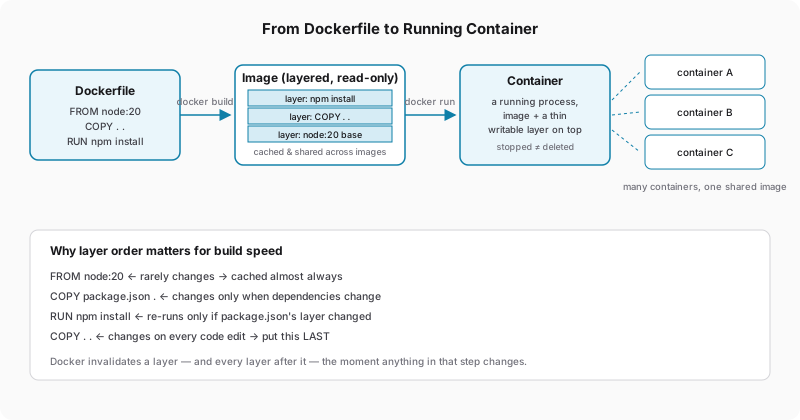
- An image is a frozen snapshot, built once from a
Dockerfile— snapledger's code baked together with its runtime, libraries, and system packages, none of which can change after the fact. - A container is what you get when Docker actually runs that snapshot: the image's contents, unchanged, sitting underneath a small writable space of the container's own, for whatever the process itself needs to create or modify while it's alive.
One image, unlimited containers. You build the web image once, and then you and Priya can each run your own container from it locally, fully independent of each other, with nothing to rebuild:
docker run --name web-you -d -p 3000:3000 snapledger-web
docker run --name web-priya -d -p 3001:3000 snapledger-web
docker stop web-you                       # the process stops; its filesystem is still sitting there
docker start web-you                      # resumes, nothing lost from its writable space
docker rm web-you                         # this is the step that actually deletes anything
Stopping a container doesn't erase it. This catches people constantly: docker stop sends a termination signal and nothing more, and everything the container had accumulated in its writable space is untouched by that signal. It's still listed in docker ps -a, and docker start brings it right back up rather than starting fresh.
$ docker ps -a
CONTAINER ID   IMAGE            STATUS                     NAMES
a1e9c2f4b8d1   snapledger-web   Exited (0) 3 minutes ago   web-you
c7f3a0d92e56   snapledger-web   Up 2 hours                 web-priya
Two containers, one image, and they don't know about each other at all — web-you stopping doesn't touch web-priya's state, its port binding, or its environment variables, because there was never anything shared between them beyond the read-only image layers underneath. That independence is what makes containers cheap to throw away and recreate: a few chapters from now, when Berrywell's traffic means you need three worker containers running at once instead of one, it's the same docker run three times, off the same image, with nothing to coordinate between them beyond what you explicitly wire up yourself.