CI/CD & DevOps65 min total · 17 parts
CI/CD Pipelines Explained: From Push to Production
Part 4 of 17 · ~2 min
Anatomy of a Pipeline
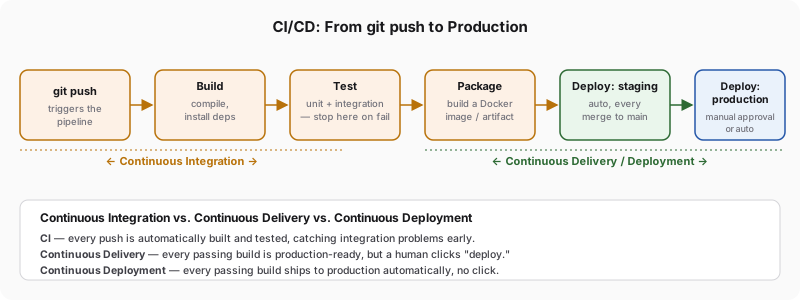
Snapledger's pipeline, like basically every pipeline on every platform, leans on the same handful of ideas underneath whatever a given tool happens to call them:
| Term | What it actually is |
|---|---|
| Trigger | Whatever kicks off a run — a new commit, an open PR, the clock, a person pressing a button |
| Workflow | The full automated response to one trigger, top to bottom |
| Job | One chunk of the workflow's work, given its own machine and walled off from every other chunk |
| Step | One command inside a job, run in order |
| Runner | The actual machine — usually a throwaway VM or container — a job executes on |
| Artifact | Whatever one job produces and hands forward to a later job or a later stage |
The part that's easy to get backwards when you're first sketching one of these out: a pipeline isn't a list, it's a graph, and most of the value in designing one well is telling genuine dependencies apart from habit. Whether web's source lints cleanly has nothing to do with whether its unit tests pass — checking both can happen at once, on two separate machines, and the pair finishes in however long the slower half takes rather than the sum of the two. Packaging the Docker image is different: it genuinely has to wait on both of those, because there's no point wrapping up code nobody's confirmed even compiles cleanly. Get that shape right and the whole run is only as slow as its single longest path through the graph; default to writing everything as one long list of steps because that's the familiar shape, and you're quietly paying for concurrency the platform was willing to give you for free.